 By LaserAegis
Licensing that fits your project
A practical starting plan for your team, shaped around your project goals, computers, duration and budget. Start with a focused pilot, including short-term use, then decide whether to expand.
Licensing & pilots
Start with the task. Shape the plan together.
You do not need to commit to a large rollout to begin. Tell us what you need to achieve and the budget you are working with. We can agree a focused pilot or short-term arrangement, with annual and three-year device licences available when a longer plan fits.
- Your starting scopeOne defined workflow or a broader project, agreed with your team.
- Your team & budgetA quotation for your computers, duration and agreed support.
- A flexible next stepShort-term use or a longer licence, with room to expand.
- See the workflow
Start with a guided demonstration focused on your engineering question.
- Agree a focused pilot
Confirm the task, duration, computers, support and budget before you begin.
- Evaluate, then expand
Review the results with your team and decide on the next scope.
Local deployment
A local browser interface. Your chosen data location.
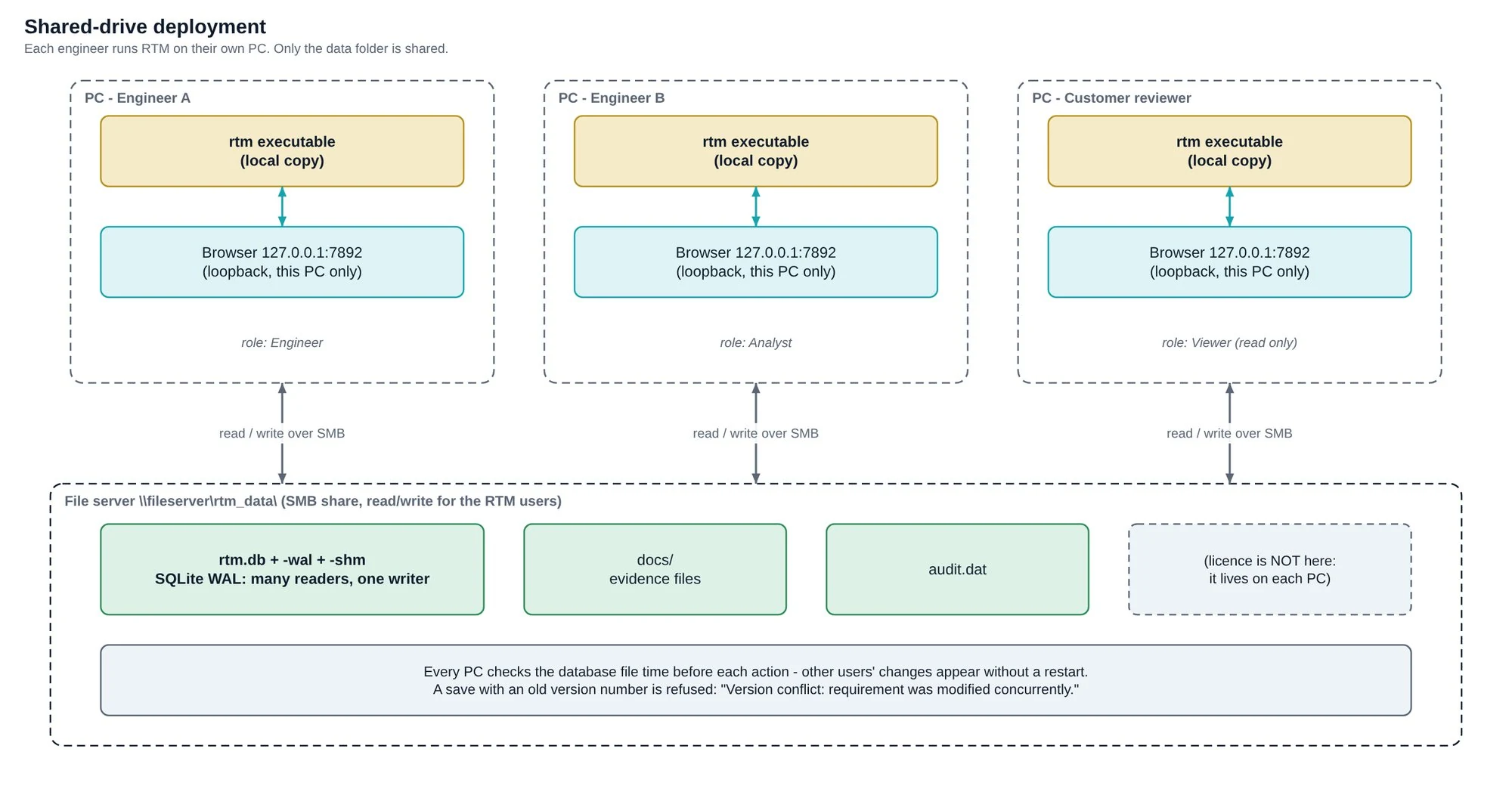
Run RTM on your computer through its local, menu-driven browser interface. No separate central server or licence server is needed.
- Choose local storage or documented shared-folder working.
- Operate and activate licences offline.
We will confirm a suitable build and deployment for your operating system, team setup and controlled environment.
 View full image ↗
Practical questions
Before you start.
Where does the browser connect?
Your browser connects to RTM running on the same computer. For team use, each computer runs its own RTM instance against the shared project data folder. Tested with ten active users. For larger teams, discuss your users, computers and shared-folder environment with us so we can confirm a suitable setup.
Does operation require an internet connection?
RTM supports offline operation and request-code licence activation. Your chosen shared data folder still needs the appropriate network access for team use.
How should we back up project data?
Back up the whole data folder with RTM closed or using an appropriate consistent snapshot, following the manual. Reports and CSV exports are readable outputs, not a full replacement for the project backup.
What if our IT team needs to approve the program?
Contact us for the supplied build and its deployment details. Follow your organisation’s software approval process. Local deployment does not remove your IT approval, shared-folder, access-control or backup requirements.
Do suppliers need an RTM licence to answer?
Suppliers can complete and return the exchange CSV files without running RTM. Your team imports and manages those responses in RTM.
Can we bring requirements from DOORS or another tool?
RTM supports documented ReqIF and CSV import/export workflows. ReqIF import does not bring in attachments, images or baselines, and rich XHTML is reduced to plain text. If a particular exchange file is important to your procurement, discuss a representative sample with us.
Does RTM guarantee compliance with our contract or standard?
RTM supports requirements, change and evidence workflows. The applicable contract, customer acceptance criteria and required outputs still determine what your team must deliver. Tell us if a customer mandates a specific tool or exchange format.
How do we arrange support or initial setup?
Contact the LaserAegis team to discuss activation, initial project setup, training or technical questions. Your quotation will identify the software and service scope.
Explore before you enquire
See what a connected project could look like.
Explore how RTM helps reduce supplier follow-up, trace change impacts and prepare for review. Includes the 10-page radar case, a practical checklist and Excel / CSV references.
Get the Free Radar Case Pack ↓